- Email: contact@import-wp.com
- WhatsApp: +34634566064
WooCommerce Sync
I had clients who ran multiple WooCommerce stores selling the same products, and they always ran into the same problem: how do you keep stock levels in sync? Whenever a product sold in one store, stock levels would fall out of sync, and they were always looking for a solution — but none of them were perfect. The easiest option was to keep stock records in a separate system and update the websites periodically. That meant triple the work: a central warehouse, generating a report, uploading it to each site… and plenty of problems along with it: it wasn’t real-time (sometimes it took days to reconcile), and it also required a lot of manual work. Other, more professional solutions relied on third-party services. Those services work well, but they come with several drawbacks: the cost (usually a monthly fee), the limits (it’s not just what you pay — you’re also capped on daily updates or number of products), and the fact that it’s a third-party service (you depend on it, your data lives outside your site, and on top of that you have to install a plugin on every site to integrate with it).
What’s the ideal solution? Do what the service does, but do it within your own WordPress. No data leaving your site, no third-party limitations, no monthly fees. Your different WooCommerce stores talk to each other, and that’s it — no more worrying. Your stock levels stay up to date across all your sites, completely transparent to you. And with the lowest possible resource usage.
Each license purchased lets you cover 5 sites — that is, you can sync 5 stores per license. If you need more than that, get in touch with us.
$99.95 / year
1 year of updates and support
30-Day money back guarantee
100% Money Back Guarantee
Buy confidently with our buyer protection and get a full refund for any reason. Read our refund policy
Current version: ⚙ 0.1
Last updated: ◷ 2026-08-21
WooCommerce Sync: how it works, step by step
WooCommerce Sync is designed for networks of WooCommerce stores that share a catalog: a physical store with its online replica, a central warehouse supplying several franchises, simply two websites of the same brand that need to keep the same stock, or two stores under one owner with an identical or partially overlapping catalog. The plugin sets up direct communication between those stores using the WooCommerce REST API, without going through third-party services or manually exporting/importing CSVs.
Unlike other solutions on the market, which offer syncing as a <strong>paid external service</strong> hosted on their own platform, here there are no intermediaries: you provide the service yourself, from your own server, talking directly to the client stores. None of your data goes out to someone else’s cloud; the entire process happens between your own WordPress installations.
Below we explain how it’s set up and how it works under the hood, so you know exactly what’s happening at every step.
You can use a fixed date or a calculated one: first day of next month, first day of next year, last day next month, last day this year, last day next year.
1 SERVER - N CLIENTS
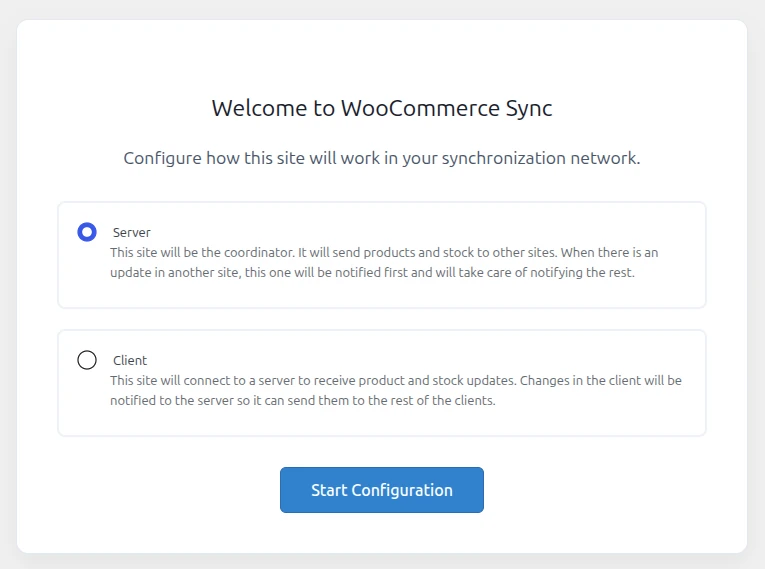
Choose the role for each store: Server or Client
The first time you activate the plugin, a welcome wizard appears asking you to choose that installation’s role:
- Server: this store acts as the coordinator. It manages the list of clients, sends and receives stock, and distributes updates among the rest of the connected stores.
- Client: this store connects to a server to receive stock updates. When stock changes on the client, it notifies the server so it can be distributed to the rest of the network.
AUTO DETECT CLIENTS
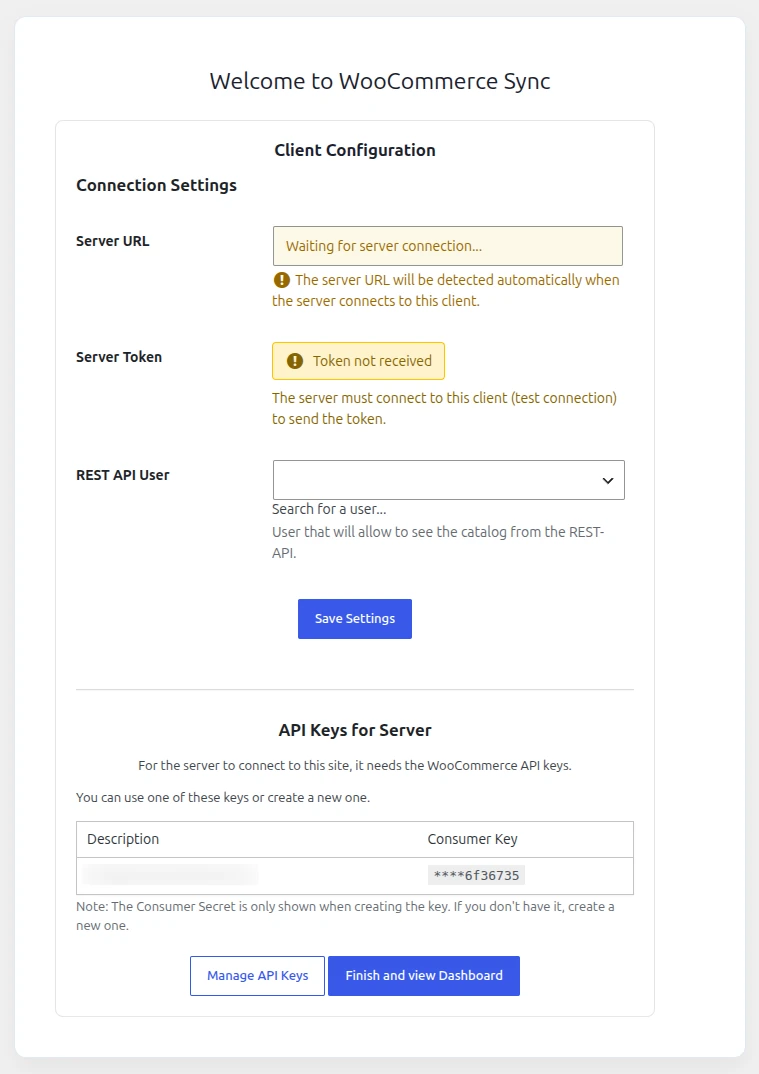
Register the client stores (from the Server)
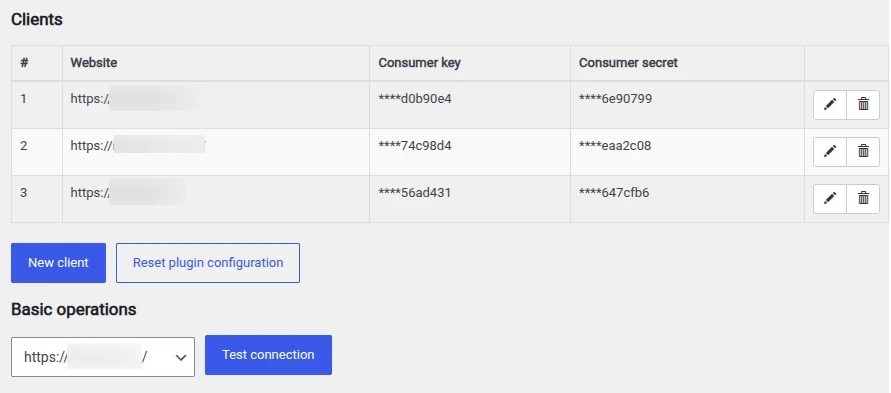
From the Server, under WooCommerce Sync → Settings you’ll find an editable table where you can add each client store with three pieces of information: the site URL, the Consumer Key, and the Consumer Secret for its REST API. These keys are masked on screen (only the last few characters are shown) for security.
Once a store is added, you can click “Test connection” to instantly verify that the keys work and that the plugin is also installed on the other end. If something fails, the plugin tells you exactly what to check (incorrect keys, API user permissions, etc.), instead of just a generic “error”.
FULL CONTROL
The management panel for each client store
Each registered client gets its own management page, organized into tabs:
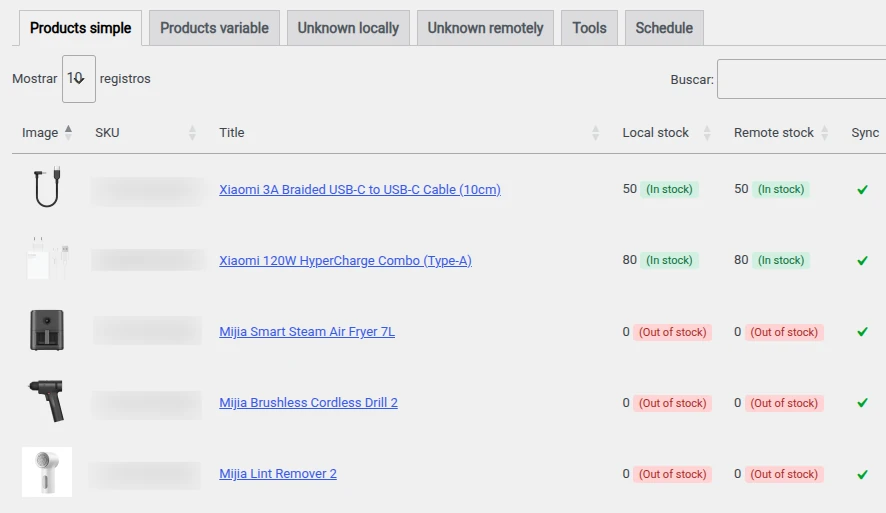
- Products (simple): a list showing image, SKU, title, local stock, and remote stock side by side. If both match, you’ll see a green check; if not, two buttons appear so you can sync in whichever direction you prefer (Local → Remote or Remote → Local).
- Products (variable): the same as above but grouped by parent product, showing each variation with its attributes (size, color, etc.).
- Unknown locally: products that exist in the remote store but not in yours, identified by SKU, so you can spot catalog items you haven’t registered yet.
- Unknown remotely: the reverse — products you have that don’t yet exist in the remote store.
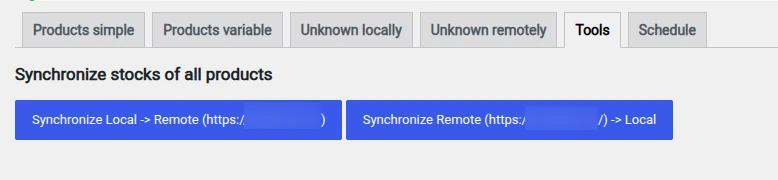
- Tools: the trigger for bulk synchronization (see point 4).
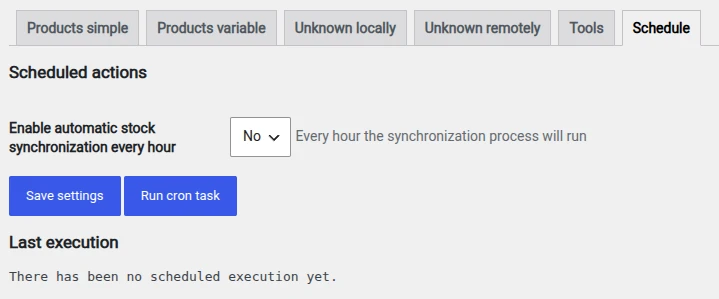
- Schedule: enable or disable automatic hourly synchronization, and check the log of the last run.
MANUAL SYNC
Bulk synchronization with a progress bar
From the Tools tab you can launch a full catalog synchronization in either direction. The process moves forward in batches (10 products by default), shows a progress bar with the percentage completed, and prints the result of each sync on screen, product by product (local ID, remote ID, SKU, and whether it updated successfully or returned an error).
At any point you can pause, resume, or stop the process without losing what’s already been synced.
AUTOMATIC SYNC
Automatic on-the-fly synchronization (the background magic)
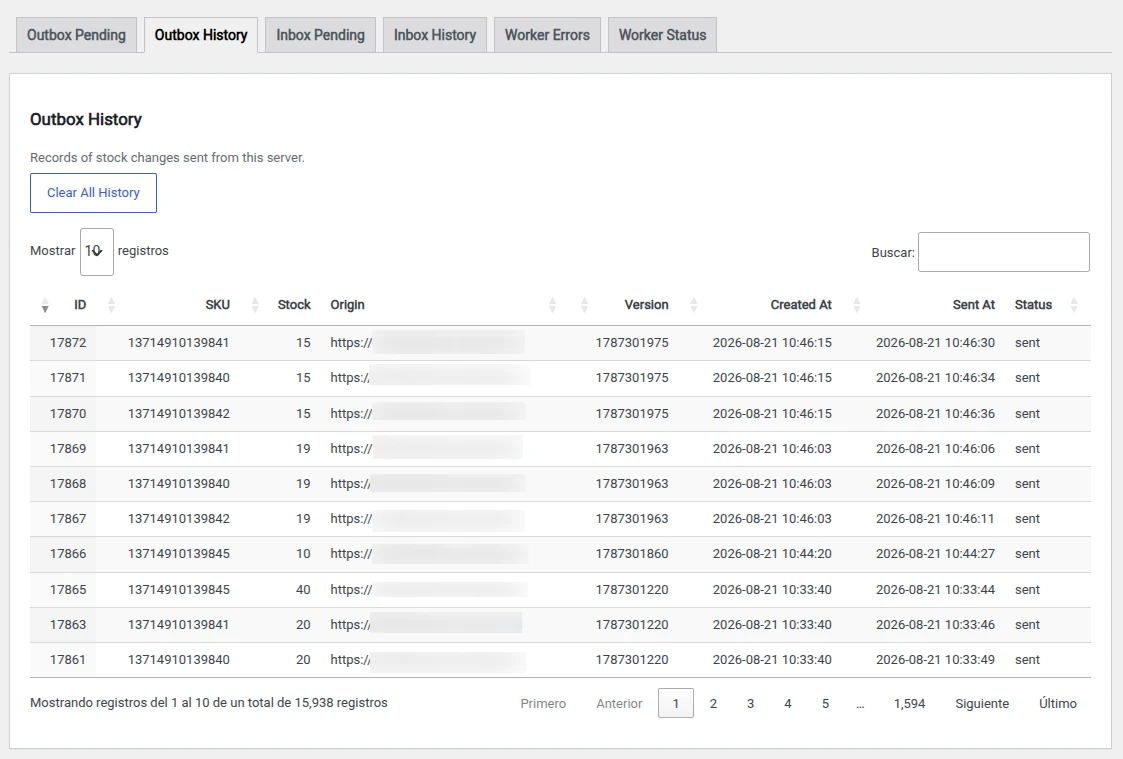
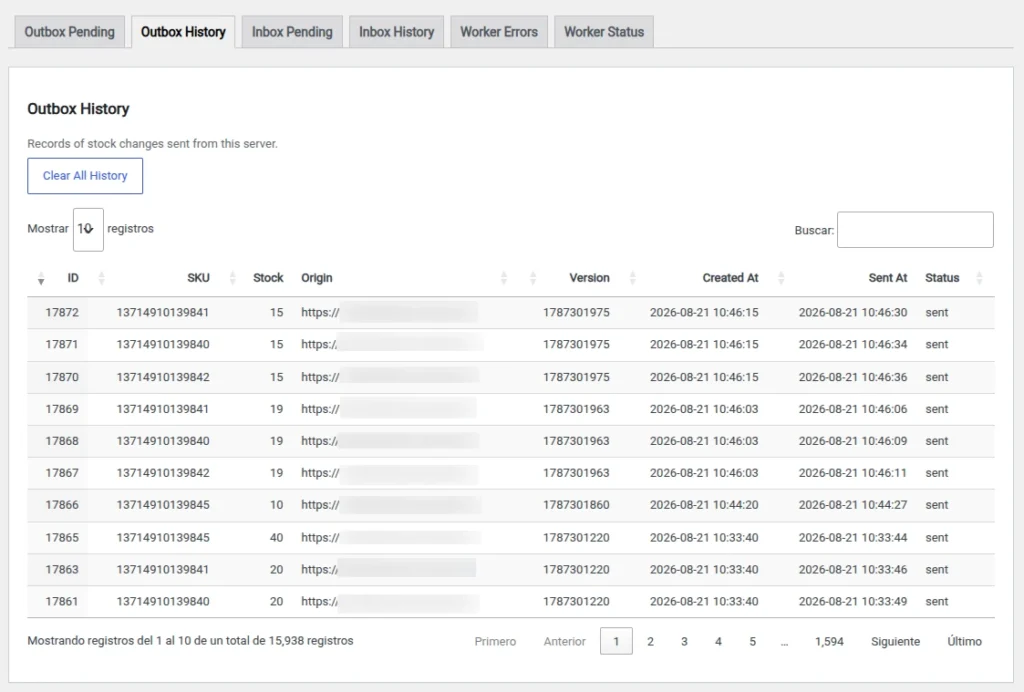
Here’s the more technical part, and the one that means you never have to remember to sync anything: the plugin hooks into the WooCommerce events that fire whenever a product’s or variation’s stock changes. At that exact moment, it logs the change (SKU, quantity, origin, and a version marker) into an internal table acting as an outbox.
A background task, managed by Action Scheduler (the same queuing system WooCommerce uses for its own processes), periodically checks that outbox and sends each pending change to the corresponding stores. On the receiving end, the change lands in an equivalent inbox and is processed the same way, which prevents synchronization loops between stores.
SCHEDULED SYNC
Scheduled synchronization (safety net)
In addition to real-time syncing, you can enable an automatic hourly pass in the Schedule tab that goes through the entire catalog. This is useful as a backup for any change that wasn’t triggered correctly (for example, after a manual edit in the database), and it leaves you a log with the result of the last run.
FULL CONTROL PANEL
Status and diagnostics panel
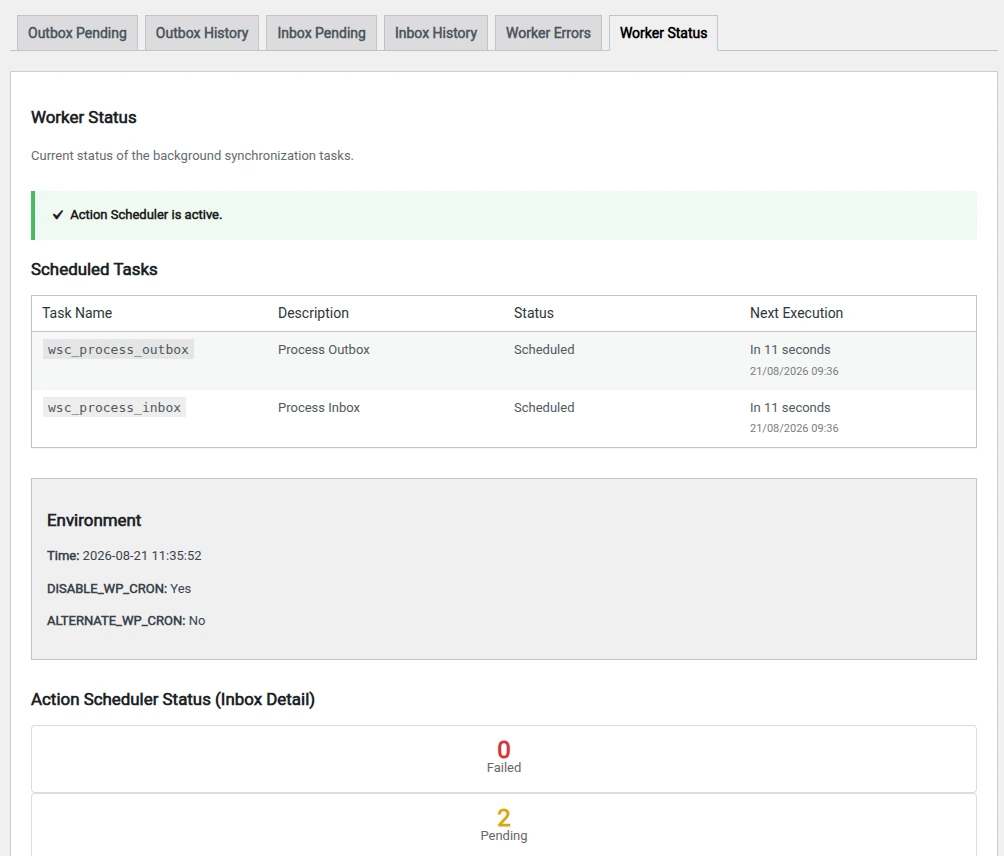
For those moments when you want to look “under the hood”, WooCommerce Sync includes a status page with:
- Full history of the outbox and inbox (pending and historical), with SKU, stock, origin, and status.
- Worker error log, with date, type, and affected item.
- Status of scheduled tasks in Action Scheduler: next run, pending tasks, in progress, and failed.
- Troubleshooting tools: force the rescheduling of stuck tasks or manually trigger processing of the outbox/inbox.
In summary
WooCommerce Sync doesn’t reinvent the wheel: it makes use of the REST API and the queuing system that WooCommerce already includes out of the box to keep stock coordinated across multiple stores, combining three sync speeds — on-the-fly, manual, and scheduled — depending on what your operation needs at any given moment. And it does so without depending on anyone else: you are the synchronization service, with your own server as the hub of the network.
Reviews
There are no reviews yet.