Codection
How to sync users between two (or more) WordPress sites
An online store and a course platform. A main site and the sites of its local branches. A membership site and its forum. If the same people use several of your WordPress sites, sooner or later you need their accounts to be the same everywhere: a customer who registers in the store should be able to log in to the courses with the same email and password, and an address changed in one site should not be outdated in the other.
WordPress does not do this by itself: every installation has its own users. In this guide we compare the four ways to share or sync users between WordPress sites, with their pros and cons, so you can choose the one that fits your case.
The short answer: if both sites are in the same database, you can share the user tables; if you are starting from scratch, WordPress Multisite shares users by design; if you only need to move users once, export and import them with a CSV file; and if you have independent sites that must stay in sync every day, in both directions, use a sync plugin like the Sync addon.
| Option | Best for | Main limitation |
|---|---|---|
| Shared user tables | Two installations in the same database | Same server and database, and roles are not shared |
| WordPress Multisite | New projects that can live in one installation | All the sites share one installation, its plugins and its updates |
| Export and import CSV | Moving users once, or loading them now and then | One direction, and only when you run it |
| Sync addon | Independent sites that must stay in sync | A premium addon installed in every site |
Option 1: share the user tables between two installations
WordPress has two constants that make an installation read its users from the tables of another one. If both sites use the same database (with different table prefixes), add this to the wp-config.php of the second site:
define( 'CUSTOM_USER_TABLE', 'wp_users' );
define( 'CUSTOM_USER_META_TABLE', 'wp_usermeta' );
Both sites will see exactly the same users, at the same moment, because they are reading the same rows. But it has important limits:
- Same database: it does not work for sites on different servers or hosting accounts.
- Roles are not shared: WordPress stores the role of each site in a meta key with the table prefix (
wp_capabilities,site2_capabilities…), so a user created in the first site has no role in the second one until you give it. - Plugins can get confused: some plugins keep user data in their own tables or expect the users table to belong to their installation.
- It has to be done at the beginning: if the second site already has users, they are not merged, they just stop being used.
Option 2: WordPress Multisite
A WordPress Multisite network is one installation with several sites. The users belong to the network, so they are shared by design, and you choose in which sites each one has a role.
It is a good solution when you are starting a new project. Converting existing sites into a network is a different story: you have to move content, media and users into one installation, all the sites share the same plugins, themes and updates, and some plugins do not support Multisite well. If your sites are already running separately, or on different servers, it is usually not worth it.
Option 3: export and import users with a CSV file
To move users from one site to another once (a migration, a new site, merging two projects), the simplest way is a CSV file. Our free plugin Import and export users and customers does it with any data:
- In the first site, go to Tools > Import and export users and customers > Export and download the users, with the option Export password hashes checked.
- In the second site, import the file. In the import assistant, match the
user_passcolumn as Password hash (from another WordPress): users keep the password they already had. - WooCommerce addresses, roles and any user meta travel in the same file.
Many people also use it to keep two sites “more or less” in sync: they export from one site and schedule a recurring import of that file in the other one. It works, but it has the problems of any file:
- Users arrive when the import runs, not when they register.
- It goes in one direction: changes made in the second site do not go back to the first one.
- If both sites change the same user, the last file overwrites everything.
- Deleted users and role changes are hard to carry over, and the file with personal data stays on a server or travels by email.
Option 4: sync users in real time with the Sync addon
For independent sites that must stay in sync every day, we have made the Sync addon for Import and export users and customers. Instead of files, the sites talk to each other through the WordPress REST API and send every change as soon as it happens, in both directions.
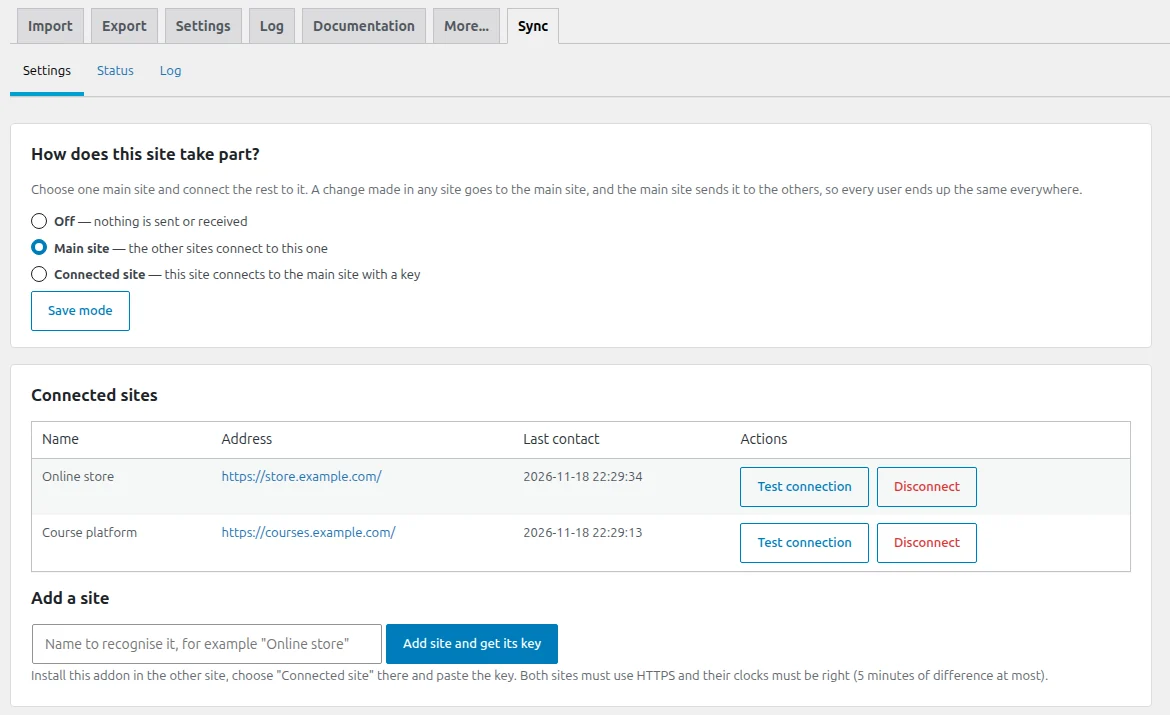
Setting it up takes a few minutes:
- Install the free plugin and the addon in every site, and choose one as the main site.
- In the main site, add the other sites. Each one gets a connection key: paste it in that site, choosing Connected site.
- Choose in every site what to sync and, if the sites already have users, run the initial sync: users that exist in both sites are matched by email, and the ones that only exist in one are created in the others.
From then on, a change made in any site goes to the main site, and the main site sends it to the rest. What it syncs:
- New users, created in the other sites with the same username when it is free.
- Email and password, so users log in everywhere with the same credentials. Only the encrypted hash travels, never the password.
- Roles, with equivalences between sites (the customer of the store can be a subscriber of the blog).
- Name, display name, website, biography and language.
- Any user meta you choose, for example the WooCommerce billing and shipping addresses with
billing_*andshipping_*.
And it is built for real sites, where things change at the same time and a server can be down for a while:
- Conflicts solved field by field: if the store changes the address and the courses change the name of the same user, both changes are kept. If both change the same field, the most recent one wins in every site.
- Deletions under control: every site decides whether a user deleted elsewhere is kept, loses their roles or is deleted too.
- Nothing gets lost: if a site does not answer, its changes wait in a queue and are retried for about 22 hours.
- Secure: every request is signed with a key that only the two sites know and cannot be sent twice. Administrators are never synced, and no change received can make a user administrator.
Which option should you choose?
| Shared tables | Multisite | CSV | Sync addon | |
|---|---|---|---|---|
| Sites on different servers | No | No | Yes | Yes |
| Sites that already exist | Hard | Hard | Yes | Yes |
| Real time | Yes | Yes | No | Yes |
| Both directions | Yes | Yes | No | Yes |
| Roles in every site | Manual | Manual | Yes | Yes, with equivalences |
| Choose what is shared | No, everything | No, everything | Yes | Yes, in every site |
| Cost | Free | Free | Free | Premium addon |
Frequently asked questions
Will users log in to all the sites at once?
Not with syncing: users have the same email and password in every site, but they log in to each one. Logging in once for all the sites (single sign-on) needs Multisite with a shared domain or a single sign-on service.
Do the sites need to be on the same domain or server?
With shared tables or Multisite, yes. With a CSV file or the Sync addon, no: they can be on different servers and domains. The Sync addon only needs HTTPS and the clocks of the servers to be right.
Are WooCommerce orders synced too?
No. The users and their data are synced, including the billing and shipping addresses, but every store keeps its own orders.
Will users get emails when their data is synced?
No. With the Sync addon, the “email changed” and “password changed” notifications are not sent for the changes received from another site.
Conclusion
Sharing tables and Multisite are good when all the sites can live together from the beginning. For everything else, the choice is between moving users with a file when you need it, with the free Import and export users and customers, or keeping them in sync automatically with the Sync addon. And if you are not sure which one fits your case, write to us and we will help you.